Diagnostics
The plugin works in the background, so it reports what it did in three places: the Diagnostics screen, Site Health and a menu in the admin bar. Start here when a translation you published does not show on the site.
Sync status
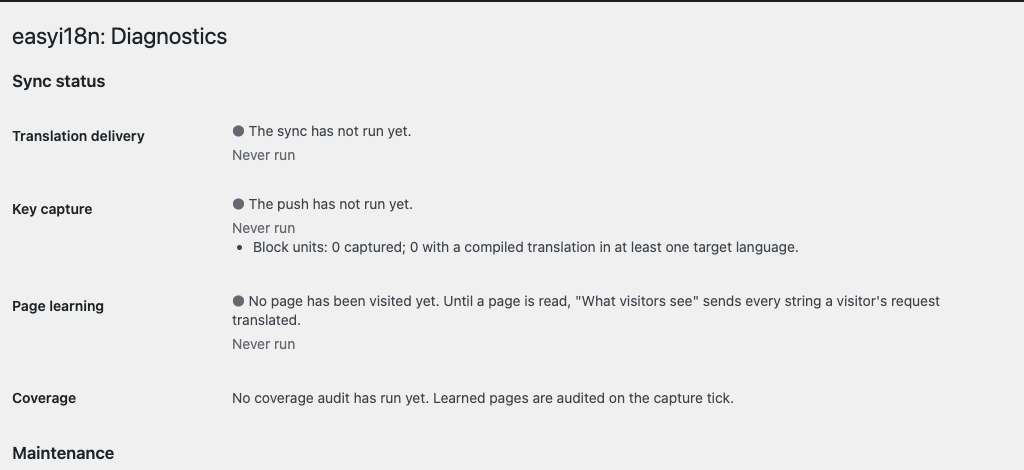
easyi18n → Diagnostics opens with one row for each background pass. A row has a coloured dot, a sentence about the last pass, how long ago it ran and what it counted.
| Row | What the pass does | Shown when |
|---|---|---|
| Translation delivery | Downloads published keys and writes the translation files | Always |
| Key capture | Sends the recorded strings to the project | Always |
| Page learning | Reads the site's own pages to learn which strings visitors see | Always |
| Coverage | Compares a page with its translation and counts what is still in the source language | Always |
| Content import | Sends new and edited posts | Translate content is on |
| Automatic translation | Asks easyi18n to translate imported posts | Translate automatically is on |
| Content pull | Downloads published translations of posts | Translate content is on |
The dot is green when the pass worked, grey when it had nothing to do yet, and red when something needs your attention. The messages you are most likely to meet:
| Message | What to do |
|---|---|
| The sync has not run yet | Wait for the first pass |
| Not configured yet — add your API key and project | Connect the project |
| Nothing captured yet, so there is nothing to sync | Switch on a text domain and load some pages |
| No translations are published yet | Publish a version of the project's keys |
| Up to date — the last poll found no changes | Nothing. This is the normal state |
| The language directory is not writable, so nothing was written | Give the web server write access to wp-content/languages/plugins |
| Push deferred — the API is rate-limiting this site; it will retry | Nothing. The next pass sends the rest |
| The capture ledger is full | Clear the ledger after switching off the domains you do not need |
| The scheduled run is overdue | WP-Cron is disabled or the site had no visits. Call wp-cron.php from a system cron job |
| Translation runs were stopped by the project's cost warning | Start the run in the dashboard, or raise the cost warning |
A pass counts as overdue when its scheduled time passed more than 30 minutes ago. A pass that stopped running would otherwise keep showing its last success.
Page learning
To send only the strings visitors see, the plugin requests a few pages of its own site and reads what they print. The Page learning row says how many pages it has read and what stopped the last visit, if anything did.
- A persistent object cache. A visit runs only on WordPress's built-in
cache. On a site with a cache drop-in such as Redis, the row says so and the
screen prints the lines to add to
wp-config.phpso the drop-in stays out of those visits. - A redirect. A page that redirects is not followed and is not tried again by itself. Fix its address, then select Retry redirected pages.
- The site cannot reach itself. The row points at the "Loopback request" check of Site Health, which says why.
Until a page has been read, the What visitors see setting sends the same strings as What visitors' requests translate, so nothing is held back by a failed visit.
Coverage
After the plugin has learned a page, it compares that page with its translated address and reports, on the Coverage row, the share of strings that differ and the first five that are the same in both. For each it names a possible origin: a managed string with no published translation, the title or body of a post, or a file of the theme. When the origin is a text domain you have not switched on, the row links to the list of domains.
The comparison is a hint. A brand name or a number is the same in every language, and a different string is not proof of a good translation.
With WP-CLI you can audit any page and get the whole list:
wp easyi18n audit /pricing/ --lang=es
It prints one line for each string still in the source language, with its possible origin and where it was found.
Clear the capture ledger
The capture ledger is the site's record of the strings it has seen. Under Maintenance, Clear the ledger empties it after you tick the confirmation box. Use it when the ledger is full of strings from a text domain you have since switched off.
- Switch off the domains you no longer want first. Otherwise the same strings fill the ledger again as pages are visited.
- Nothing is deleted in the easyi18n project, and nothing is charged twice: the project recognises the strings it already has.
- Translations already on the site stay. After the ledger is cleared, the next delivery rewrites the files with the strings recorded since, so a string that no page has shown again yet appears in the source language until one does.
Rebuild the content map
The site remembers which document of the project belongs to each post. That record lives only in the site's database: restoring a backup or moving to another host can lose it, and the next import could then create a second document for a post, against an allowance that deleting does not give back.
Under Maintenance, Rebuild the content map reads the list of published documents from the project and restores the record. It creates no documents, spends no credits and never replaces a pairing the site already has. A document that was never published is not in that list, so its post stays unpaired.
Run it after a restore or a move, before the next import pass. The result says how many pairings were rebuilt and lists the posts it left alone.
Site Health
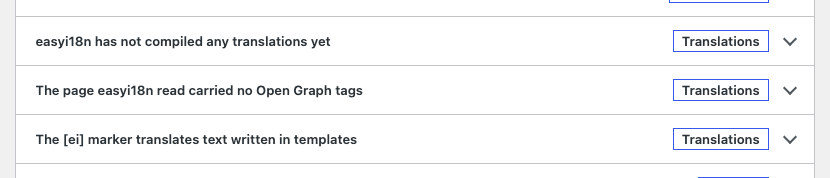
The plugin adds its checks to Tools → Site Health, where they show up with the checks of WordPress itself. None of them is reported as critical: in each case the site keeps working and shows the source language.
| Check | What it reports |
|---|---|
| WordPress language packs | A target language whose WordPress pack is not installed, with a link to install it. Without the pack, dates stay in English. Present once the site has target languages |
| Plural formats from the translation service | Plural translations the plugin could not read. Those strings stay in the source language. Update the plugin |
| Formatting tags that block a translation | Posts with an empty formatting tag, each with a link to edit it. Present with Translate content on |
| Open Graph tags from more than one source | The theme and an SEO plugin both print social tags, so a share can show the untranslated set |
| The [ei] marker for text in templates | Another plugin uses the [ei] shortcode. Use [easyi18n]…[/easyi18n] instead |
A check that has had nothing to measure says so, for example "easyi18n has not compiled any translations yet". It does not report a pass before it has looked.
The admin bar menu
Administrators get an easyi18n menu in the admin bar. On a public page it lists the same page in each language, so you can compare them:
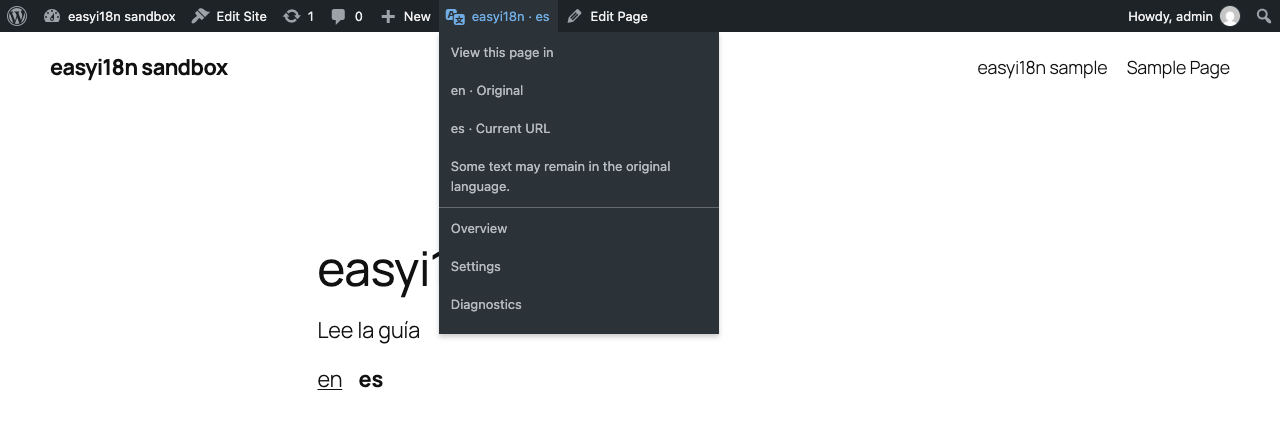
- The source language is marked Original, and the language of the address you are on Current URL. The address can be Spanish while part of the text is still in the source language.
- Every configured language is listed, including one the public switcher leaves out because the post has no published translation in it.
- Previews, 404 pages, and posts that are not public or have a password offer no comparison.
- When the site is not ready, the menu says what is missing: no project connected, no target language, or plain permalinks.
The menu also links to Overview, Settings and Diagnostics, and in wp-admin to View site.